
Blog
What Is a PCB BOM File
Perhaps you’ve opened your computer case and marveled at the intricate circuit board inside. In reality, this isn’t a simple process; it involves both designing and manufacturing the bare circuit board and then assembling the components onto it. The PCB serves as the foundation, while the components are the functional elements—both are indispensable.
During this process, you will inevitably encounter a concept called the BOM. Unlike schematic diagrams and PCB layout diagrams, which define the circuit’s functionality, the BOM files detail the actual components used to build the circuit board.
This article from PCBCool will introduce you to BOM files in a clear and practical way, focusing on real-world manufacturing and assembly requirements, rather than purely theoretical knowledge.
What is a BOM in PCB Design
BOM stands for Bill of Materials. It’s a structured list of all the components required to assemble a PCB. This critical technical document details the raw materials, components, parts, and other key information needed to manufacture a specific PCBA board. It tells the manufacturer which parts are needed, how many are required, and where those parts come from. Simply put, it’s like a “detailed shopping list + assembly instructions” for manufacturing a PCBA, acting as a vital bridge that connects various stages of PCB design, procurement, production, and testing.
Although it doesn’t describe the physical layers of the circuit board like Gerber files do, your assembly project would be impossible without an accurate BOM file because:
- The procurement department uses the BOM to compile a materials list, specifying part numbers, specifications, brands, quantities, and packaging.
- The unit price and quantity of all materials listed in the BOM are used to calculate the material cost for the project, which directly impacts pricing.
- The BOM helps with project version control, especially during design iterations.
- In case of failure, the after-sales department uses a repair BOM to quickly locate and replace faulty components and establish a standardized repair process.
Therefore, even a small error in the BOM can lead to assembly line shutdowns, shipping delays, or forced last-minute component replacements.
Core Fields in a PCB BOM
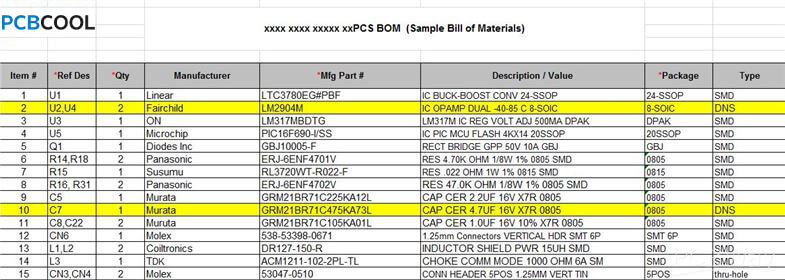
Every BOM used for production should include the following key fields:
- Reference Designator: This identifies the location of each component on the PCB, such as R1, C5, U2, or J1. It serves as a reference for soldering and repair.
- Part Name and Specifications: This describes the electrical characteristics or name of the component. For example, “0603 10kΩ ±1% Resistor,” “0.1μF 50V X7R Capacitor,” or “STM32F103C8T6 Microcontroller.”
- Package and Packaging: The physical package size and pad layout of the component, such as SOP-8, QFP-48, 0402, DIP-16, etc. This ensures compatibility with the PCB design.
- Manufacturer Part Number (MPN): A unique number that identifies the purchased component, ensuring that the purchased components match the design specifications.
- Material Code: The company’s internal unified part number, which is used in ERP systems and warehouse management to prevent confusion between materials with the same name but different specifications.
- Quantity: The number of component units required for each PCB, facilitating production and material management.
- Remarks: Special instructions, such as alternative models, soldering direction, anti-static requirements, and purchasing priority.
BOM vs CPL vs Gerber
| Comparison Item | BOM | CPL | Gerber |
|---|---|---|---|
| Purpose | Lists all components required for PCB assembly. | Specifies the placement of components on the PCB. | Defines how the PCB is physically fabricated, including copper layers, drill holes, etc. |
| Content | Component names, part numbers, specifications, and quantities. | Component placement coordinates (X, Y), orientation, and reference designator. | Copper trace layers, solder mask, drill files, and layer definitions. |
| Key Information | – Part name and specifications (resistors, capacitors, etc.)- Quantity needed- Manufacturer Part Numbers (MPN) | – Placement coordinates- Component orientation- Reference designator (e.g., R1, C5) | – Copper layers- Drill paths- Solder mask layer- Via locations |
| Primary Use | To provide a complete list of all parts for procurement and assembly. | To guide machine placement of components during PCB assembly. | To ensure correct physical fabrication of the PCB, defining layer stack-up and hole locations. |
| Required for | – Procurement- Assembly- Cost estimation- Material tracking | – Automated Pick-and-Place machine programming- Component placement during assembly | – PCB fabrication- Drilling- Solder mask application |
| Associated Files | None (just a list of parts) | – XY coordinates of components- Placement instructions for assembly automation | – Gerber files for each layer- Drill files for hole locations |
| Example Information | “0603 10kΩ ±1% Resistor””0.1μF 50V X7R Capacitor” | “R1: X=5.2mm, Y=10.4mm, 90° Rotation””U2: X=12.5mm, Y=20.8mm, 0° Rotation” | “Layer 1: Copper traces” “Layer 2: Solder mask” “Drill file for via locations” |
| File Format | Typically a CSV or Excel file. | Typically a CSV or text file with coordinates and orientation. | Gerber format (RS-274X) for PCB layers, Excellon for drill files. |
| Critical for | Accurate assembly, correct parts, and avoiding procurement delays. | Automated assembly and accurate component placement. | PCB manufacturing process, including layer alignment and hole drilling. |
Common BOM Errors
Part Number Errors or Inconsistencies
One of the most common errors involves part numbers. This can include issues such as duplicate part numbers, missing part numbers, or discrepancies between part numbers and the PCB silkscreen or schematic. For example, there may be two components marked as R1, or the part number in the SMT placement program may not match the actual part.
Consequences:
These errors can result in incorrect SMT placement, difficulties locating components during repairs, or mass soldering errors, leading to assembly issues.
Mitigation:
To avoid this, verify part numbers against the schematic after exporting the BOM. It’s also important to use EDA software for part number validation and perform thorough consistency checks before production begins.
Package Marking Errors
Package marking errors occur when the package type or pin count is incorrect. For example, a component listed as SOP-8 may be mistakenly marked as DIP-8, or a QFP package may have the wrong pin count. Additionally, package dimensions may not match the actual component size, leading to placement or mounting issues.
Consequences:
These errors can prevent components from being properly mounted or cause the pads to not align with the component leads, which may result in scrapped PCBs or the need for re-prototyping.
Mitigation:
Ensure that the BOM package information is consistent with the PCB library and component datasheet. New packages should be physically verified before use in production.
Alternative Material Management Issues
Alternative materials can sometimes cause confusion if not properly managed. For instance, alternative materials may not be specified in the BOM, or the parameters of alternative materials might be incompatible with the original components. Additionally, incorrect prioritization of alternative materials, as well as outdated alternative materials not being updated in the BOM, are common problems.
Consequences:
Using incorrect or outdated alternative materials can lead to inconsistent product performance, failure to meet certification standards, mass failures, and difficulties in after-sales repair.
Mitigation:
To mitigate this, ensure that alternative materials undergo hardware verification. The BOM should clearly indicate priority, applicable scenarios, and certification status for each alternative material. Additionally, an approval process should be established for replacing materials during production.
Inconsistency Between Drawings and BOM
Another common issue arises when there is a mismatch between the schematic or PCB layout and the BOM. This can occur if the drawings are modified but the BOM is not updated accordingly, or if materials are added or removed from the BOM without updating the associated drawings.
Consequences:
These inconsistencies can lead to discrepancies between the design and the final product. As a result, production may proceed with incorrect materials or designs, causing mass production issues.
Mitigation:
To prevent this, always modify the drawings first, followed by updating the BOM. Perform a consistency check between the drawings and BOM before releasing them for production.
Final Thoughts
The BOM is far more than just a parts list—it’s a critical communication tool that bridges the gap between designers, purchasers, and manufacturers.
By creating accurate, well-structured BOM files, designers can help ensure smoother assembly, better cost control, and more reliable production outcomes.
A strong BOM, when combined with clean Gerbers and placement data, is essential for the success of any PCB project.
At PCBCool, we specialize in providing comprehensive PCB manufacturing and assembly solutions. With over 20 years of experience, we ensure that every step of the process—from BOM creation to final assembly—is executed with precision and quality. Whether you’re looking for support with your BOM files or need reliable, efficient PCBA production, PCBCool is your trusted partner in turning designs into reality.
Frequently Asked Questions (FAQ)
A: Ensure the materials and components are compatible with the specific manufacturing environment, checking supplier availability, lead times, and certification requirements.
A: Use a version control system for your BOM and update it immediately to reflect any design changes. Notify all stakeholders to ensure consistency.
A: Find suitable alternative parts and verify their compatibility before updating the BOM.
A: Clearly differentiate components and materials for each layer, such as vias and internal materials, to ensure accuracy.
A: While similar BOMs can be used, adjustments should be made to optimize material costs, procurement, and supply chain management for full-scale production.
A: Cross-check your BOM against the schematic, PCB layout, and Pick-and-Place files. Use EDA software for compatibility verification.
A: Failing to update the BOM after changes can cause production delays, incorrect components, and costly errors.
A: Use a base BOM and create distinct versions for each variant, clearly labeling variant-specific components and characteristics.
A: Yes, a BOM helps troubleshoot by providing necessary details to replace components and ensure parts match the design specifications.
A: Organize components by type, function, or layer to ensure clarity and easy reference.
A: Make sure your BOM complies with standards like IPC-2581 for design data and IPC-A-610 for assembly quality requirements.
Loki has worked in international trade and PCB since 2021, with experience in PCB fabrication, assembly, and customer communication. At PCBCool, he supports technical content publishing and helps connect customer inquiries with the right account manager for efficient project follow-up.